24
Curated machines
Multitrack, mastering, low-speed, portable, cassette and PCM profiles.
The Mastering Suite / User Guide
OXIDE
Dynamic Convolution Tape Engine
Twenty-four magnetic, cassette and early digital characters captured as level-dependent convolution. OXIDE changes with level, not just with a static impulse response.
24 curated models
H1-H5 dynamic kernels
388 samples at 48 kHz
Mono / Stereo native
00 / Overview
A tape engine that responds to the performance.
OXIDE is not a generic waveshaper with a tape label. Each model combines its linear frequency and phase response with level-dependent H2-H5 harmonic kernels. Drive harder and the magnetic character changes with the source.
5
Convolution orders
H1 carries the complete linear response while H2-H5 reproduce dynamic colour.
24 blocks
Model crossfade
Prepared models are switched outside the audio callback and crossfaded without clicks.
01 / Installation
Install the engine and its authenticated library together.
Apple Silicon and Intel
The notarized DMG installs Audio Unit, VST3, the standalone application and the OXIDE kernel library.
- Close every DAW and plug-in host.
- Open the OXIDE distribution DMG.
- Run
Install OXIDE Tape Engine.pkg. - Rescan plug-ins or restart the host.
VST3 and Standalone
The setup executable installs the VST3, standalone application and encrypted kernel library.
- Close every DAW and plug-in host.
- Run the OXIDE setup as administrator.
- Complete the installer wizard.
- Rescan the VST3 folder in the host.
Wait for ready
Model preparation happens away from the audio callback. During loading, OXIDE outputs latency-aligned source audio instead of silence.
- Insert OXIDE on a mono or stereo track.
- Wait for
NATIVE ENGINE READY. - Choose a model and begin gain matching.
02 / Signal Flow
Level drives the model before the final blend.
The dry side is delayed to the same latency as the tape side. This keeps Source/Tape phase coherent and makes Bypass a meaningful comparison.
01Input / Drive
02Level follower
03Kernel interpolation
04H1 linear path
05H2-H5 colour
06Harmonics scale
07Source / Tape
08Output trim
09Host output
Input and Output are not interchangeable. Input changes which dynamic
kernels are excited. Output changes only the final level. Match Output
after setting Input so loudness does not make the processed signal seem
automatically better.
03 / Controls
Seven controls, each with one clear job.
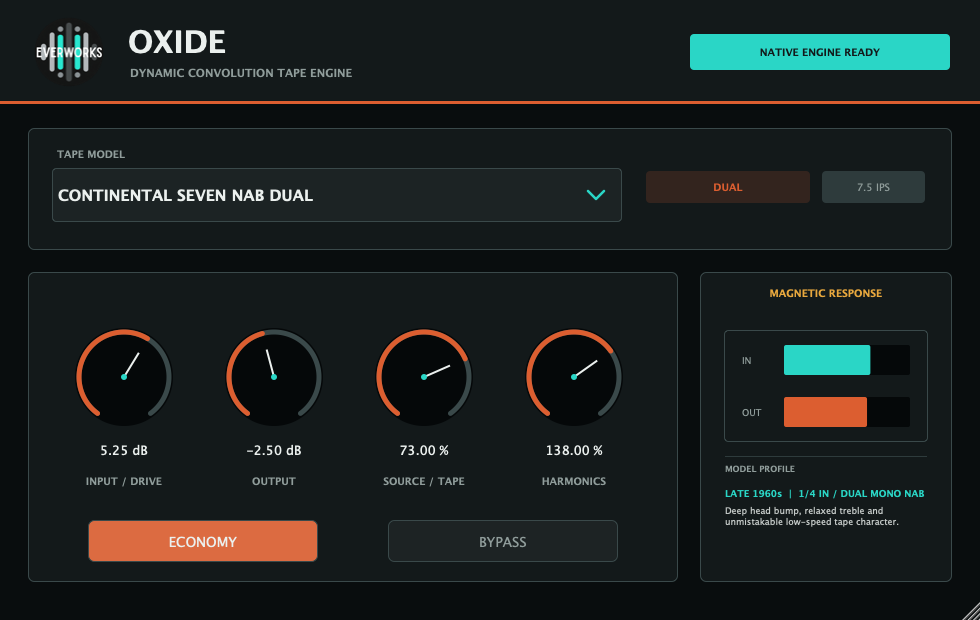
Tape Model
24 choicesSelects the complete linear and nonlinear machine profile. Model loading is prepared in the background.
Start with 30 IPS for focus, 15 IPS for weight and 7.5 IPS or cassette for obvious character.Input / Drive
-24 to +24 dBSets the level entering the dynamic convolution engine. Higher values move the model into denser harmonic states.
Use Output to compensate after the desired density is reached.Output
-24 to +24 dBApplies clean gain after Source/Tape. It does not change the magnetic response or harmonic selection.
Level-match bypass before choosing between models.Source / Tape
0 to 100%Crossfades between latency-aligned source and processed tape. Zero is source; 100% is the complete tape path.
Parallel settings between 20% and 70% often preserve transient definition.Harmonics
0 to 200%Scales the level-dependent H2-H5 contribution without removing the selected model's H1 frequency and phase response.
Zero keeps the linear machine response; 100% is calibrated; values above 100% exaggerate colour.Economy
On / OffUses H1-H3 and a bounded dynamic tail. The complete linear response remains active while H4-H5 are omitted.
Use Full for printing and mastering decisions; Economy for large sessions or tracking chains.Bypass
On / OffReturns the latency-aligned source path for honest comparisons without changing the timing seen by the host.
Compare at matched level, especially when Input is positive.Magnetic Response
IN / OUTThe dual meter shows the current input and output peaks. The profile panel identifies era, format, speed and model character.
The meter is diagnostic; use your DAW meters for final loudness and true-peak decisions.
04 / Tape Library
Twenty-four distinct production characters.
Names describe the useful format, era and speed without relying on external machine branding. Search by model, speed, format or character.
24 models shown
| Model | Format / Speed | Character |
|---|---|---|
| FOUNDRY 15 | Multitrack / 15 IPS | Dense low-mid weight, rounded attacks and audible tape compression. |
| FOUNDRY 30 | Multitrack / 30 IPS | Faster response, firmer transients and less head bump. |
| ARCHIVE NAB 15 | Multitrack NAB / 15 IPS | Rounded highs, steady mids and pronounced tape weight. |
| ARCHIVE NAB 30 | Multitrack NAB / 30 IPS | Cleaner transients, tighter bass and extended upper response. |
| PACIFIC MASTER 15 WIDE | Stereo / 15 IPS | Full-bodied mastering colour with broad lows and smooth upper mids. |
| PACIFIC MASTER 30 WIDE | Stereo / 30 IPS | Open mastering profile with tight bass and gentle sheen. |
| TRACKHOUSE 15 | Multitrack / 15 IPS | Classic tracking density, enhanced body and forgiving attacks. |
| TRACKHOUSE 30 | Multitrack / 30 IPS | Tighter tracking tone with stronger detail and reduced low bloom. |
| SWISS RAIL A 15 | Multitrack / 15 IPS | Solid low-mid punch, smooth saturation and confident tracking tone. |
| SWISS RAIL A 30 | Multitrack / 30 IPS | Clean, fast response with articulate attacks and deep headroom. |
| SWISS RAIL B 15 | Multitrack / 15 IPS | Modern analogue weight, smooth peaks and stable bandwidth. |
| SWISS RAIL B 30 | Multitrack / 30 IPS | High-headroom tracking profile with taut lows and crisp detail. |
| BROADCAST CROWN 15 WIDE | Stereo / 15 IPS | Refined stereo glue, rich centre and gracefully rounded top. |
| BROADCAST CROWN 30 WIDE | Stereo / 30 IPS | Reference-speed clarity, firm lows and subtle cohesion. |
| STUDIO FERRIC 15 | Multitrack / 15 IPS | Saturated studio body, broad low mids and smoothly contained peaks. |
| STUDIO FERRIC 30 | Multitrack / 30 IPS | Extended bandwidth, quicker attacks and subtle ferric colour. |
| CONTINENTAL SEVEN IEC WIDE | Stereo / 7.5 IPS | Vintage bloom, softened highs and a spacious stereo response. |
| CONTINENTAL SEVEN NAB DUAL | Dual mono / 7.5 IPS | Deep head bump, relaxed treble and unmistakable low-speed character. |
| CONTINENTAL MASTER | Dual mono / 15 IPS | Smooth mastering weight, stable imaging and polished saturation. |
| CONTINENTAL REFERENCE | Stereo / 15 IPS | Broadcast-grade focus with clean lows, even mids and controlled peaks. |
| FIELD REEL IV | Portable / 1/4 inch | Portable recorder immediacy with textured mids and compact attacks. |
| CASSETTE AMBER | Ferric cassette | Warm softness, rounded detail and a familiar compressed midrange. |
| CASSETTE PEARL | Hi-fi cassette | Polished cassette tone with soft peaks and even spectral balance. |
| PCM AURORA | Digital tape / PCM | Early digital precision with firm transients and restrained colour. |
05 / Workflows
Choose speed first, then drive, then colour.
Master bus cohesion
Start with a stereo 30 IPS model. Add only enough Input to make peaks sit together, then match Output precisely.
Input +1 to +3 dBTape 70-100%Harmonics 60-100%Full
Drum bus density
Use a 15 IPS multitrack profile for body or 30 IPS for harder attacks. Parallel blend keeps the front edge intact.
Input +3 to +7 dBTape 55-85%Harmonics 100-140%Full
Bass weight
Start at 15 IPS. If the fundamental becomes too broad, switch to the matching 30 IPS model before reducing drive.
Input +2 to +5 dBTape 70-100%Harmonics 70-110%Output match
Vocals and instruments
A 30 IPS tracking model adds density with less head bump. Lower Harmonics when sibilance or bow texture becomes forward.
Input +1 to +4 dBTape 40-75%Harmonics 50-100%Economy optional
Parallel tape return
Drive the engine harder and reduce Source/Tape. This exposes harmonic texture while keeping the original transient path.
Input +5 to +10 dBTape 15-40%Harmonics 100-160%Output match
Lo-fi statement
Choose a cassette or low-speed model. Use Harmonics above calibration only after deciding how much top-end softening the model should retain.
Input +6 to +12 dBTape 80-100%Harmonics 120-180%Full
06 / Technical
Native processing with explicit host timing.
Latency
At 48 kHz OXIDE reports 388 samples, or 8.083 ms. The dry path is internally aligned to the processed path.
Full engine
Evaluates H1-H5 with level interpolation across the captured dynamic states.
Economy engine
Evaluates H1-H3, preserves the complete H1 response and bounds the dynamic tail for lower CPU use.
Sample rates
The production kernels are converted to the active host rate during model loading. No manual SRC setting is required.
Channel layouts
Native mono and stereo layouts are supported. Mono sessions process one active audio channel.
Resource integrity
The production library is encrypted and authenticated. Modified, truncated or incompatible resources are rejected before use.
OXIDE is a colour processor, not a limiter. Leave enough headroom after
Output and use a true-peak meter later in the chain when mastering.
07 / Troubleshooting
Read the status before changing the mix.
| Status | Meaning | Action |
|---|---|---|
| NATIVE ENGINE READY | The selected model is prepared and active. | No action required. |
| LOADING MODEL | A new model or sample-rate version is being prepared. | Wait briefly; aligned source audio continues. |
| KERNEL LIBRARY NOT FOUND | The authenticated model library is missing from its installed location. | Close the host and rerun the complete installer. |
| MODEL LOAD FAILED | The model resource is incomplete, incompatible or failed authentication. | Reinstall OXIDE. Do not move individual kernel files. |
| ENGINE IDLE | The audio device or host processing graph has not prepared the plug-in. | Start transport, enable the track or reopen the audio device. |
Every model sounds identical
Confirm that the status reads NATIVE ENGINE READY after each selection. Set Source/Tape to 100%, Harmonics to 100% and use a moderate positive Input value while comparing. If the status reports a library error, rerun the complete installer.
The plug-in is louder, but I cannot judge the colour
Lower Output until bypass and processed loudness are closely matched. Input changes the dynamic response, so do not compensate by reducing Input unless the saturation itself is excessive.
Economy sounds slightly less complex
This is expected. Economy keeps H1-H3 and omits H4-H5. Use Full when upper-order texture matters, especially for exposed buses, mastering and final printing.
The host reports latency
OXIDE intentionally reports its partitioned convolution latency. At 48 kHz this is 388 samples. Keep plug-in delay compensation enabled in the DAW.
The model changes a moment after selection
Model preparation occurs off the audio callback, then the completed model is atomically published and crossfaded. This avoids blocking the real-time audio thread.