Optimized Engine
The original Everworks cleanup response runs locally in a faster engine built for Apple Silicon, Intel and Windows x64.

THE VOID V2 preserves the original Everworks model and its 3.8 ms live path in a faster cross-platform engine. Turbo adds a stronger 100-200% cleanup range without adding latency.
The original Everworks cleanup response runs locally in a faster engine built for Apple Silicon, Intel and Windows x64.
Turbo changes the Void Amount display from the normal 0-100% range to 100-200% for difficult sources.
Normal and Turbo report 182 samples at 48 kHz, approximately 3.8 ms. Turbo adds no extra latency.
The measured full stereo VST3 process fell from 31.914% to 19.044% on an M3 Max at 48 kHz / 128 samples, a 40.3% reduction.
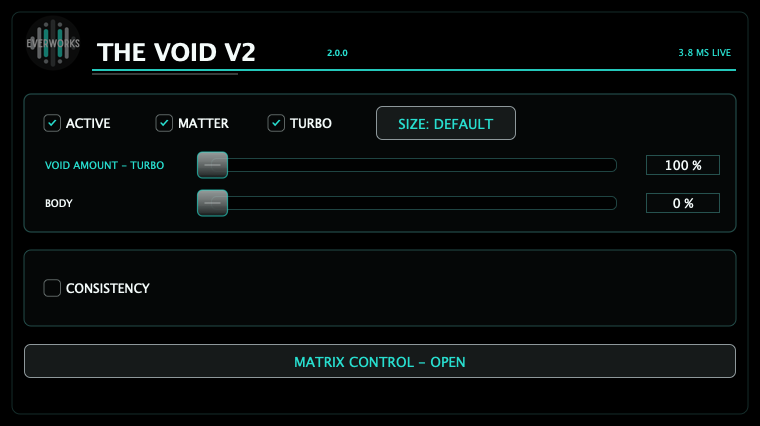
| Control | What it does | Practical use |
|---|---|---|
| Active | Enables or bypasses the complete processing path. | Use for level-aware A/B checks and emergency bypass. |
| Void Amount | Controls the original cleanup response from 0-100% in normal mode. | Raise it until the source becomes cleaner, then stop before body or articulation is damaged. |
| Turbo | Switches Void Amount to 100-200% for stronger cleanup. | Use when 100% is useful but insufficient. Compare against normal 100% before pushing further. |
| Matter | Enables the source-aware restoration stage and reveals Body. | Turn it on only when strong cleanup removes useful density or continuity. |
| Body | Controls the Matter restoration amount and starts at 0%. | Increase gradually while checking consonants, room tails and bleed. |
| Size | Changes the plugin window size only. | It does not alter sound, CPU or latency. |
| Setting | Cleanup behaviour | Latency |
|---|---|---|
| Normal 0-100% | Preserves the original Everworks response and normal amount range. | 3.8 ms measured path. |
| Turbo 100% | Matches full normal cleanup. | Same measured path. |
| Turbo 200% | Extends cleanup depth with protected output limits. | Same measured path. |
| Control | Function | Starting point |
|---|---|---|
| Consistency | Reveals and enables Target and Speed. | Leave off unless source level varies materially. |
| Target | Sets the desired loudness direction from -30 to -15 LUFS. | -24 LUFS. |
| Speed | Selects Slow, Medium or Fast response. | Medium for general use; Slow for natural long-form speech. |
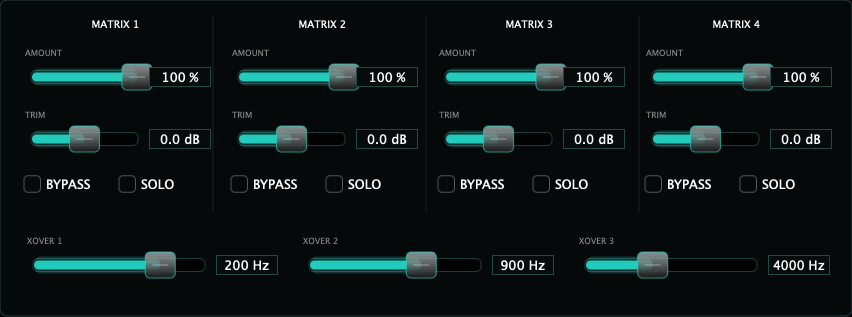
Rumble, proximity build-up and low-frequency stage wash.
Mud, boxiness, room tone and vocal body.
Intelligibility, source focus and mid-range pressure.
Hiss, air, bright bleed and high-frequency cleanup.
| Control | Function | Use |
|---|---|---|
| Amount | Sets cleanup intensity independently for each band. | Reduce the affected band if the source loses body, presence or air. |
| Trim | Rebalances each band after cleanup. | Set Amount first; use Trim for small corrections. |
| Bypass / Solo | Disables or auditions one Matrix region. | Use to locate a problem, then judge the full signal with Solo off. |
| Crossovers | Set the three band boundaries. Defaults: 200 Hz, 900 Hz and 4 kHz. | Move only when the source problem falls across a default boundary. |
Leave Turbo, Matter and Consistency off. Set Void Amount from 0% while listening at matched level.
If normal 100% still leaves unwanted spill or room energy, enable Turbo and move gradually toward 200%.
Enable Matter and raise Body from 0% only if cleanup removes useful density.
Use Solo to locate the band, disable Solo, then adjust Amount before Trim.
Use it for level movement, not as a substitute for cleanup. Begin at -24 LUFS / Medium.
| M3 Max · 48 kHz / 128 | Previous release | V2 optimized | Reduction |
|---|---|---|---|
| Full stereo process CPU | 31.914% | 19.044% | 40.3% |
| Full mono process CPU | 15.629% | 9.734% | 37.7% |
| Stereo prepare time | 282.026 ms | 19.504 ms | 93.1% |
| Stereo memory delta | 63.625 MB | 29.766 MB | 53.2% |
| Problem | Likely cause | Fix |
|---|---|---|
| Void Amount starts at 100% | Turbo is enabled. | Disable Turbo to return to the normal 0-100% range. |
| Body is hidden | Matter is disabled. | Enable Matter, then raise Body from 0%. |
| Target and Speed are hidden | Consistency is disabled. | Enable Consistency. |
| The result is thin or over-suppressed | Turbo or one Matrix Amount is too high. | Return to normal mode or lower the affected Matrix band before adding Trim. |
| The host reports the wrong build | An older THE VOID binary is still installed or cached. | Run the included uninstaller, install V2, then force the host to rescan plugins. |
| Windows shows SmartScreen | The current Windows x64 beta is functionally tested but unsigned. | Verify the package checksum and allow it only when downloaded from everworks.dev. |
| Report item | Include |
|---|---|
| System | Host, OS, CPU, plugin format, sample rate and host block size. |
| Source | Handheld vocal, lavalier, headset, lectern, dialogue, vocal bus or other material. |
| Settings | Void Amount, Turbo, Matter / Body, Consistency, Matrix values and crossovers. |
| Performance | Host CPU with true mono or stereo routing and the number of simultaneous instances. |
| Result | Useful extra cleanup, over-suppression, tonal loss, artifacts, recall issue or host issue. |