Run the signed package
Open the universal DMG and run Install FAT BOY.pkg. It installs AU, VST3, the standalone application and this guide. Apple Silicon and Intel use the same package.
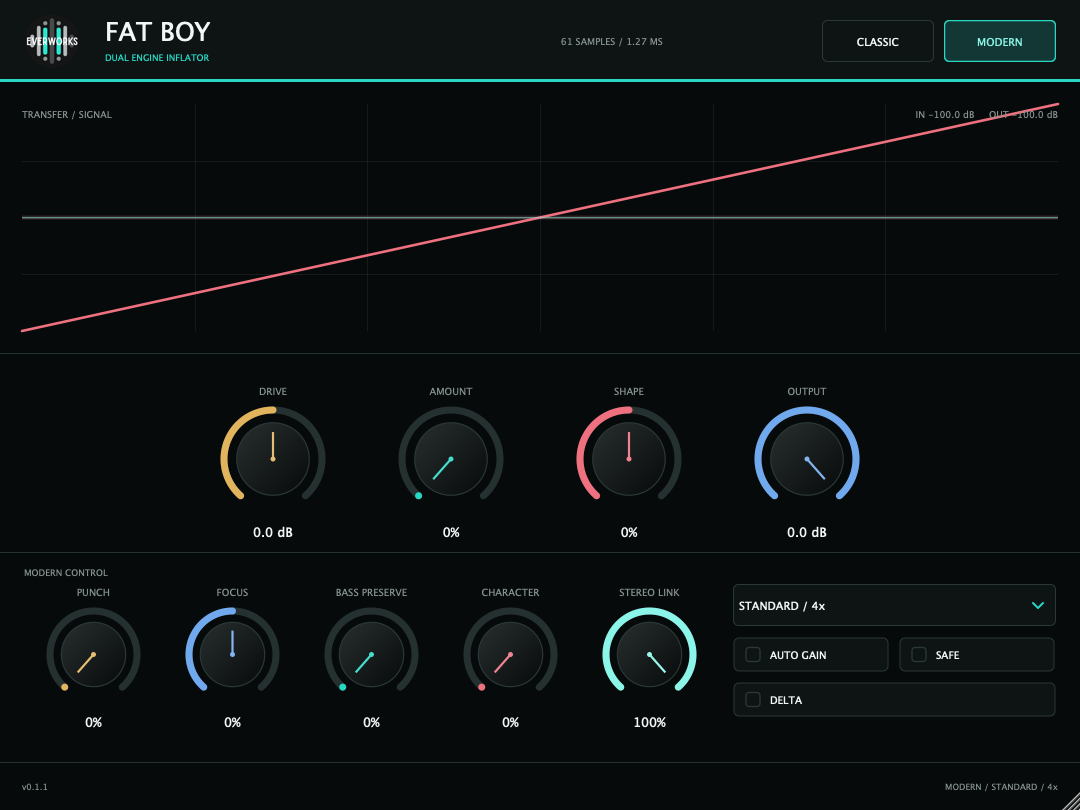
One exact classic inflator. One wider modern harmonic instrument. Pick the engine, set the level, and make the change intentional.
Close audio hosts before installing. FAT BOY ships with a conventional installer and complete uninstall path on both supported platforms.
Open the universal DMG and run Install FAT BOY.pkg. It installs AU, VST3, the standalone application and this guide. Apple Silicon and Intel use the same package.
Launch the Windows installer as an administrator. It places VST3 in the shared system folder and the standalone application under Everworks.
Reopen the DAW and refresh its plugin cache if FAT BOY does not appear immediately. Logic uses AU; most other supported hosts can use VST3.
FAT BOY is level-dependent. Feed it deliberately, compare at matched loudness, and decide whether you need the exact Classic color or the expanded Modern engine.
Use Classic for the familiar reference response. Use Modern when you need transient, spectrum, low-end and character control.
Raise Input/Drive until the transfer reacts, then use Effect/Amount to blend the nonlinear result with the source.
Use Output or Modern Auto Gain before judging. Louder nearly always sounds better for a moment; matched level tells the truth.
The modes are separate signal paths. Classic is preserved for repeatable color and parity. Modern is an Everworks design with stronger control and overload-safe transfer behavior.
The authorized reference behavior: original transfer, overload foldback, Split path, clipping option and minimum/maximum-phase oversampling.
A monotonic saturator with independent transient contour, harmonic focus, low-band restoration, odd/even character and stereo-aware control.
Classic keeps the shorter interface and the reference control set. Start at 1x or 2x Min Phase, then move to a higher quality only when the source benefits from it.
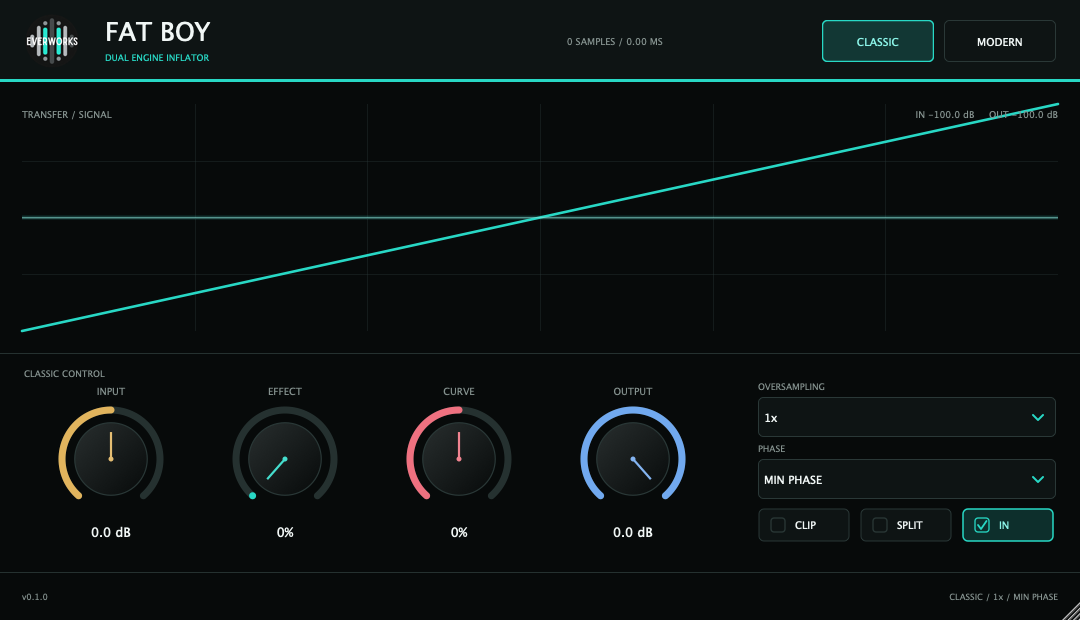
Drives the transfer before processing. More Input means more density and more overload interaction.
Blends the shaped signal with the aligned dry signal. At 0% the nonlinear contribution is absent.
Changes the transfer contour. Positive values feel denser and more forward; negative values are softer and more open.
Post-process attenuation for level matching and headroom. It does not alter how hard the input hits the engine.
Clip enables the reference output clip. Split selects the internal split path. In enables or bypasses Classic shaping.
Select 1x, 2x, 4x or 8x. Min Phase is the practical real-time path; Max Phase prioritizes phase symmetry and adds latency.
Modern expands the interface. Its four primary controls establish the nonlinear sound; the lower row decides how that sound moves, where it lives and how safely it leaves the plugin.
Sets the level into the saturator. Use it as the main density control before Amount and Shape.
Controls the wet nonlinear path. Punch, Focus, Bass Preserve and Character require Amount above 0%.
Moves the base monotonic transfer from softer to firmer curvature without entering Classic foldback.
Protects transients from excessive saturation and adds a transient contour of up to approximately 5.6 dB.
A wide harmonic tilt around 1.8 kHz. Turn left for body and lower harmonics; turn right for presence and upper harmonics.
Restores the unprocessed low band below approximately 190 Hz, keeping kick and bass fundamentals stable under drive.
Morphs from odd symmetry toward a bounded asymmetric, even-rich transfer. DC is removed continuously.
Links transient and Auto Gain decisions between channels. Use 100% to keep stereo movement stable; reduce for dual-mono behavior.
Auto Gain matches long-term pre-drive power. Safe bounds peaks. Delta outputs the removed or added difference for diagnosis.
These are starting ranges, not presets. Move Drive first, then match output. Use Delta briefly to understand the intervention and turn it off before final listening.
Use Classic for a known color or Modern with modest Drive. Keep transients intact and compare at matched loudness.
Raise Punch until attacks recover, then move Focus right only if cymbal harmonics remain controlled.
Use Bass Preserve to stop saturation from changing the weight of the fundamental while Character adds upper translation.
Push Drive and Character harder, use Delta to inspect the added material, then return to normal output and blend with Amount.
FAT BOY reports the selected latency to the host. Changing engine, oversampling, phase or quality updates host compensation automatically.
| Engine | Mode | 48 kHz latency | Recommended use |
|---|---|---|---|
| Classic | 1x | 0 samples | Tracking, auditioning, minimum CPU |
| Classic | 2x / 4x / 8x Min | 49 / 56 / 60 samples | Mixing and normal mastering |
| Classic | 2x / 4x / 8x Max | 3388 / 3431 / 3465 samples | Offline or latency-tolerant mastering |
| Modern | Live / 2x | Reported by host | Lowest-latency Modern monitoring |
| Modern | Standard / 4x | 61 samples | Default mix and mastering path |
| Modern | Master / 8x | Reported by host | Final render and exposed high-frequency material |
Classic Max Phase is useful when its phase behavior solves a specific problem. It is not automatically better, and its roughly 70 ms latency at 48 kHz makes it unsuitable for live monitoring.
Nonlinear processors can gain level quickly. FAT BOY gives you Output, Auto Gain and Delta so that density, transient shape and spectrum can be judged separately from loudness.
Toggle host bypass after matching integrated loudness. A small peak difference is acceptable; a large average-level difference is not.
Delta outputs the processed difference. Use it to find pumping, unwanted low-end movement or excessive high harmonics.
Safe applies oversampled soft peak control plus a final sample bound. It is protection, not a certified true-peak mastering limiter.
Most apparent faults are caused by a zero wet amount, uncompensated gain, an unsuitable phase mode or a host that has not refreshed its plugin cache.
Confirm that Modern is selected and Amount is above 0%. The advanced controls shape the Modern wet path; with Amount at 0% there is no harmonic path to reshape.
Enable Modern Auto Gain or reduce Output. Then compare again after the long-term gain matcher has settled.
Classic Max Phase is active. Choose Min Phase or Modern Live/Standard for low-latency work.
Close the DAW, rescan AU/VST3 plugins and reopen the host. On macOS, verify the plugin is in the system Audio Plug-Ins folder.
Set Stereo Link to 100%. Lower values deliberately allow each channel to make more independent transient and gain decisions.
Use AU in Logic Pro and other AU hosts. Use VST3 in REAPER, Cubase, Nuendo, Studio One, Ableton Live and compatible plugin servers.